
D01·DOCS
VoxDSTAR documentation
Getting started
What you need before you key up, and the shortest way to a first contact.
- 1A licence and a callsignREQUIRED
You transmit on amateur radio networks, so the usual rules apply.
- 2REF reflectorsREGISTERED
REF reflectors only accept callsigns registered in the D-STAR gateway system. VoxDSTAR signs in for you, like a hotspot does. XLX usually needs nothing, though some use allow lists.
- 3A data connectionWI-FI · MOBILE
Any connection that reaches the reflector.
- 4Android 8.0 or newerARM · x86-64
32 or 64-bit ARM, or x86-64.
First contact
- 1InstallAPK
Get the APK from GitHub Releases and install it on your radio or phone.
- 2CallsignMY
Put in your callsign.
- 3EchoUR
Set UR to Echo and key up: you hear your own audio back, without going on air.
- 4LinkMEMORIES
Pick a reflector and module from your memories or the reflector lists.
- 5Call CQCQCQCQ
Set UR to CQCQCQ, listen first, then press PTT.
D02·DOCS
Made on a 240-pixel screen. Fine on a phone
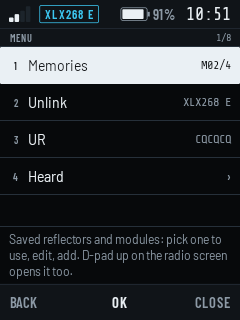
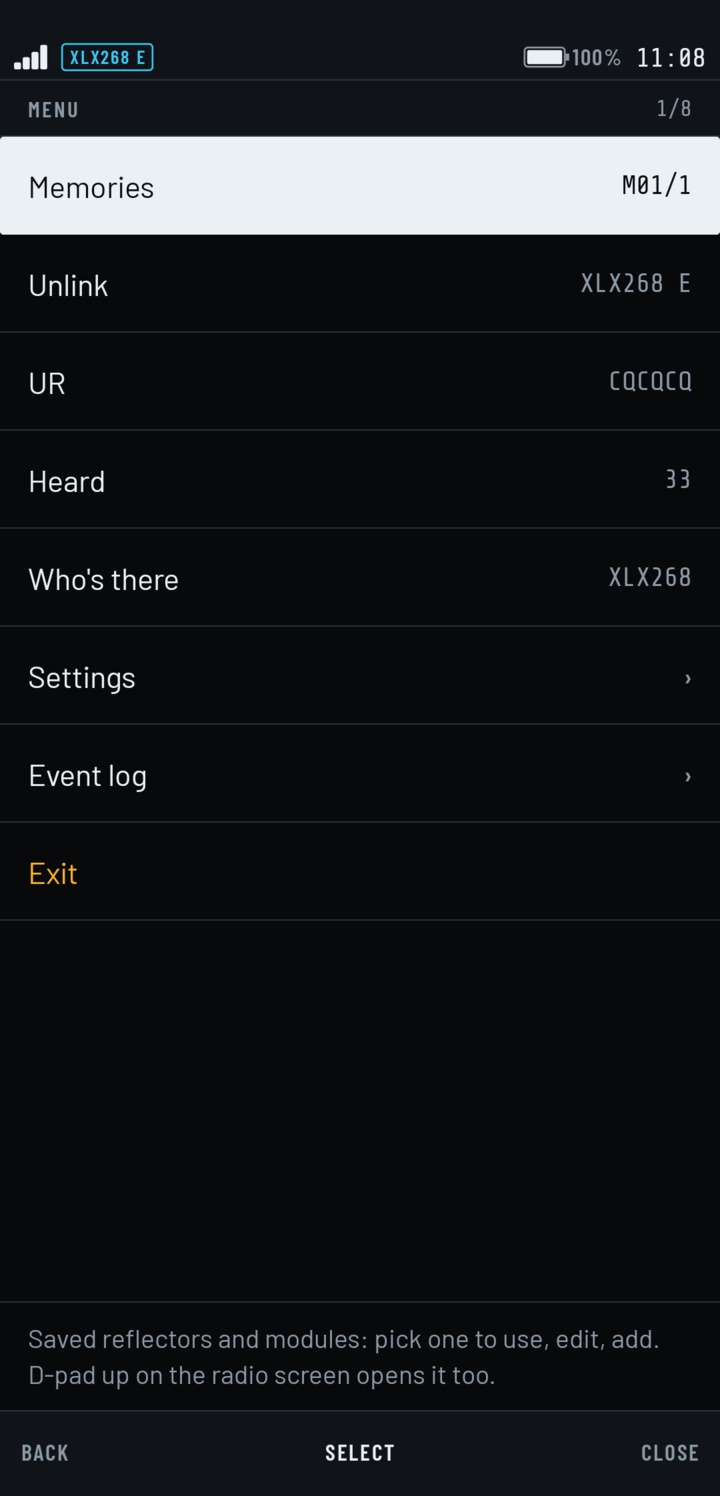
VoxDSTAR was designed for the smallest screen first: a Hytera HYT-P50 at 240 × 320. Phones get the same display with room to spare and a PTT key you can reach.
- Hytera HYT-P50ANDROID 12 · 32-BIT
Where it's used daily. Side PTT, knob, and the home-screen card shows the reflector and who's talking.
- Smartship m3_hANDROID 9 · 32-BIT
Runs as is. PTT, knob and side keys arrive the way the firmware sends them.
- Android phonesANDROID 8.0 AND UP
Tested on a Pixel 9. On-screen PTT, or a headset button.
D03·DOCS
Keys
Every function can be bound to whichever key you press for it. Out of the box on a HYT-P50:
- 1PTTF2 · SIDE
Hold to talk, or latch it: one tap to start the over, one to end it.
- 2KnobF5 · F6
Steps your memories or the modules, and relinks once you stop turning.
- 3Learn a keyPRESS IT
Bind PTT, step, link, menu, call-back and replay to whichever key you press.
- 4HeadsetWIRED · BT
A headset or Bluetooth media button can key PTT.
- 5Never by accidentTX OFF
PTT waits while a station is talking, and the TX time-out warns you before it cuts in.
D04·DOCS
Screen off
The link stays up with the radio in your pocket. These live under Settings › Screen & keys.
- 1Wake on RX5 S
A call heard with the screen off lights it, over the lock screen.
- 2Wake on TXON
Pressing PTT lights the screen and holds it on while you talk.
- 3Link lost2 S … 1 MIN
A dropped link is redialled, at once when the network comes back.
- 4Start at bootON · OFF
Switch the radio on and it links by itself. Android lets it listen until you open the app once.
D05·DOCS
Reflectors and calling
- 1MemoriesM01 …
Reflector, module, name. Mark one as Home and return home after a quiet spell.
- 2Find a reflectorREF · XRF · XLX
The public REF, XRF and XLX lists, fetched when you ask.
- 3Who's thereXLX
Reads an XLX dashboard: modules in use, their names, who's linked and who was heard last.
- 4URCQCQCQ
CQ, Echo, Unlink, Info, or a callsign. Call back the last station heard in one press.
- 5HeardREPLAY
The last ten overs kept in memory, to play again if you missed one.
- 6MoreON TEST
Watch up to three extra modules, D-PRS positions, callsign routing over ircDDB, voice or Morse announcements.
D06·DOCS
Display, language and sharing
- 1LanguagesEN · PT
English and Portuguese, or whatever the radio is set to.
- 2DisplayNIGHT · DAY
A dark screen for indoors, a light one that reads in direct sun.
- 3Share settingsQR
Your callsign and memories as a QR code or a link, to set up a second radio.
D07·DOCS
Nothing between the microphone and the reflector
D-STAR voice is AMBE, a codec that usually lives in a chip: in the radio, in a USB dongle, or behind a hotspot. VoxDSTAR runs it in software on the device and speaks the reflector protocols itself.
- Microphone
The radio's own, a headset or Bluetooth.
- AMBE 2400
Encoded on the device, 20 ms at a time.
- DPlus · DExtra · DCS
Linked, kept alive and redialled by the app.
- Reflector
REF, XLX, XRF or DCS, over any data connection.
The two shaded stages run inside VoxDSTAR.
Not neededDV DONGLEHOTSPOTD-STAR RADIO
- 1Encode, HYT-P503.4–3.9 MS
Per 20 ms frame: about a fifth of one core on a 32-bit radio.
- 2Encode, Pixel 92.0 MS
Per 20 ms frame. Decoding takes under half a millisecond on both.
D08·DOCS
What has been heard on the air
VoxDSTAR is new. Here is where each part stands, so you know what to expect.
- 1REF linkingHEARD
Linked to REF095 and held the link.
- 2XLX linkingHEARD
Linked to XLX268 and held the link.
- 3Two-way contactsHEARD
Others hear our transmissions, and we hear them.
- 4DCS and XRF linksON TEST
Built in, not yet confirmed on a live reflector.
- 5Callsign routingON TEST
Over ircDDB (QuadNet). Receives only where UDP port 40000 reaches the device.
- 6D-PRS positionsON TEST
Built in, not yet confirmed on the air.
- 7Watched modulesON TEST
Built in, not yet confirmed on the air.
VoxDSTAR is an independent project by CT7BLE. It isn't affiliated with or endorsed by ICOM, JARL or DVSI; "D-STAR" names the protocol it speaks. Privacy policy