
M01·DPLUS
D-STAR on the radio you already carry
VoxDSTAR links an Android push-to-talk radio or a phone to D-STAR reflectors. You hear every over with the caller's callsign and talk on the side key. No dongle and no hotspot.
- REFLECTORS
- REF · XLX · XRF · DCS
- HEARD ON THE AIR
- REF · XLX
M02·DPLUS
Keys first. Touch is the fallback
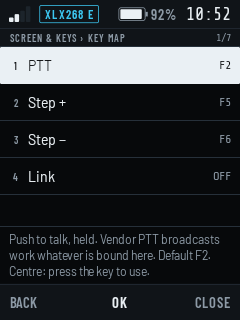
On a radio, your thumb already knows where everything is. VoxDSTAR uses the side PTT and the channel knob, and learns any other key you press for it.
- 1PTTF2 · SIDE
Hold to talk, or latch it: one tap to start the over, one to end it.
- 2KnobF5 · F6
Steps your memories or the modules, and relinks once you stop turning.
- 3Learn a keyPRESS IT
Bind any function to whichever key you press.
M03·DPLUS
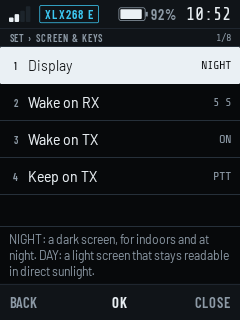
Screen off. Still on the air
The link stays up with the radio in your pocket. Calls come through and PTT still works. A call can wake the screen, and so can keying up.
Callsign, timer and reception quality while you listen.
Red only while you transmit, so it's never in doubt.
Example callsigns.
M04·DPLUS
Your reflectors, a turn of the knob apart
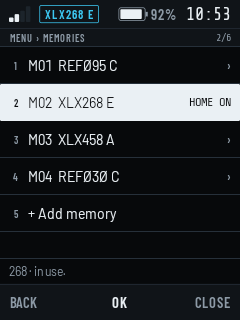
Keep the reflectors and modules you use as memories, mark one as Home, and step through them with the knob. Need a new one? Find it in the reflector lists without typing an address.
- 1MemoriesM01 …
Reflector, module, name. Return home after a quiet spell.
- 2Who's thereXLX
See who is linked to an XLX reflector before you join.
- 3HeardREPLAY
Play the last overs again if you missed one.
M05·UR
Install it and call CQ
Get the APK from GitHub and install it on your radio or phone. Put in your callsign, pick a reflector, and you're on the air.
ANDROID 8.0+ · ARM 32/64-BIT, x86-64
- 1A licence and a callsignREQUIRED
You transmit on amateur radio networks, so the usual rules apply.
- 2A radio or a phoneANDROID 8.0+
A HYT-P50, a Smartship m3_h, or any Android phone. Radios
- 3REF reflectorsREGISTERED
REF reflectors only accept callsigns registered in the D-STAR gateway system. XLX usually needs nothing.
Linking and two-way contacts are confirmed on REF and XLX reflectors. DCS links, D-PRS positions, callsign routing and watched modules are built in and are still being tried on the air. Status
VoxDSTAR is an independent project by CT7BLE. It isn't affiliated with or endorsed by ICOM, JARL or DVSI; "D-STAR" names the protocol it speaks. Privacy policy